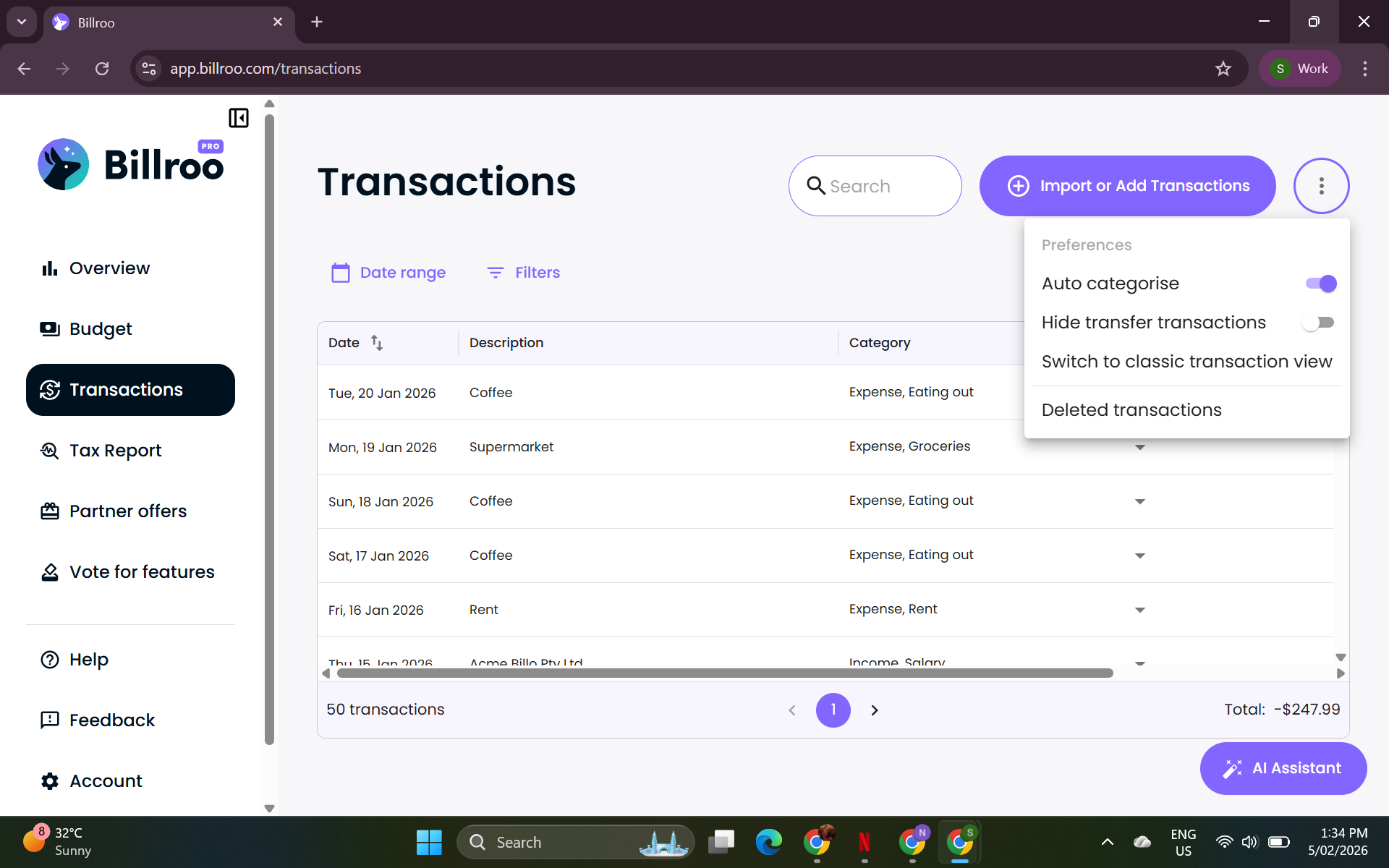
How Does Auto-Categorisation Work
This handy tool is designed to help you manage your transactions more efficiently by automatically assigning categories to synchronized transactions as they come through.
How Auto Categorise Works
The Auto Categorise feature may not always be 100% accurate right from the start. But don't worry! The system learns and improves over time as you manually categorize your transactions. This helps it adapt to your unique spending habits and preferences.
When Auto Categorise is turned on, Billroo will automatically assign categories to your transactions based on patterns it learns from your previous categorization choices. If you decide to turn it off, all new transactions will remain uncategorized until you manually assign them.
Tip: Even with auto-categorise on, you can always manually change any category assignment if Billroo gets it wrong. The more you correct it, the better it learns your preferences!
How to Turn Auto-Categorisation Off
If you prefer to manage your categories manually, you can easily disable the Auto Categorisation feature in either the mobile app or desktop version of Billroo:
Go to the Transaction tab.
Click on the three dots in the top right-hand corner of the screen.
Toggle the box next to Auto-categorise transactions to switch it off (or on again).
Need Help?
If you have any further questions or need assistance with this feature, please let us know. We're here to help! 😊