
What’s New on the Transactions Page
We’ve made several updates to improve your experience on the transactions page. Here’s a quick guide to the latest features:
1. Switch to Classic View
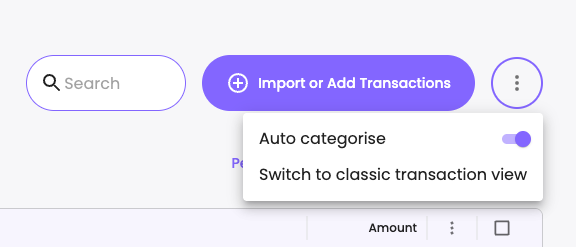
We understand that some users prefer the old transactions page. You can now easily switch back to the Classic Transactions View via the new menu in the top-right corner of the transactions page. Feel free to toggle between the new and classic views at any time!
2. Column Adjustments
Improved Readability: The minimum widths of the Description and Category columns have been increased.
Resizable Columns: You can manually adjust column widths using the new resize handles for a more customized view.
3. Responsive Design Enhancements
To improve usability on smaller screens, the Bank Accounts column is now hidden by default, giving more space to your essential columns.
4. Auto-Categorise Toggle
The top-right menu now includes a toggle for auto-categorising your transactions, making it easier to keep your records organised.
5. Quick Access to Classic Transactions
You can switch to the old transactions page directly by visiting:
app.billroo.com/transactions?variant=legacy
Note: This link won’t change your default view automatically. You can choose to make the classic view your default or return to the new page at any time.

6. Manage Columns
You now have full control over which columns are displayed:
Click the three dots in any column header to access options like Hide Column or Manage Columns.