
How To Export Transactions to Excel or Google Sheet
Edited
Exporting your transactions is a straightforward process on the Billroo website. If you usually use Billroo on the mobile app, you can login to the website using the same email address that you signed up to the mobile app with.
Follow the simple steps below to get your selected transactions in a CSV format.
Steps to Export Transactions
To export transactions, just follow these easy steps:
Navigate to the Transaction Page.
Select the transaction(s) you wish to export.
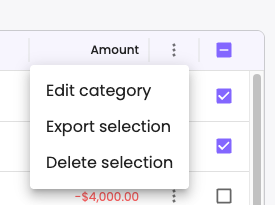
Click on the three dots (⋮) to open the options menu.
Select Export Selection from the menu.
Once you complete these steps, you will receive a CSV file containing the selected transactions, making it easy to manage and analyse your data.
export
Was this article helpful?
Sorry about that! Care to tell us more?