Trouble-Shooting: Transactions not Auto-Categorizing
Auto-categorization is a handy feature in Billroo that helps you manage your transactions effortlessly. If this feature is turned off, you may find yourself manually categorizing each transaction, which can be time-consuming. Typically, the auto-categorize option is enabled by default, but it’s always good to double-check!
How to Check and Enable Auto-Categorization
To ensure that your transactions are being auto-categorized, follow these simple steps:
Log in to Billroo on your computer using the same email address you registered with either online or via the app
Select the Transactions tab from the main menu.
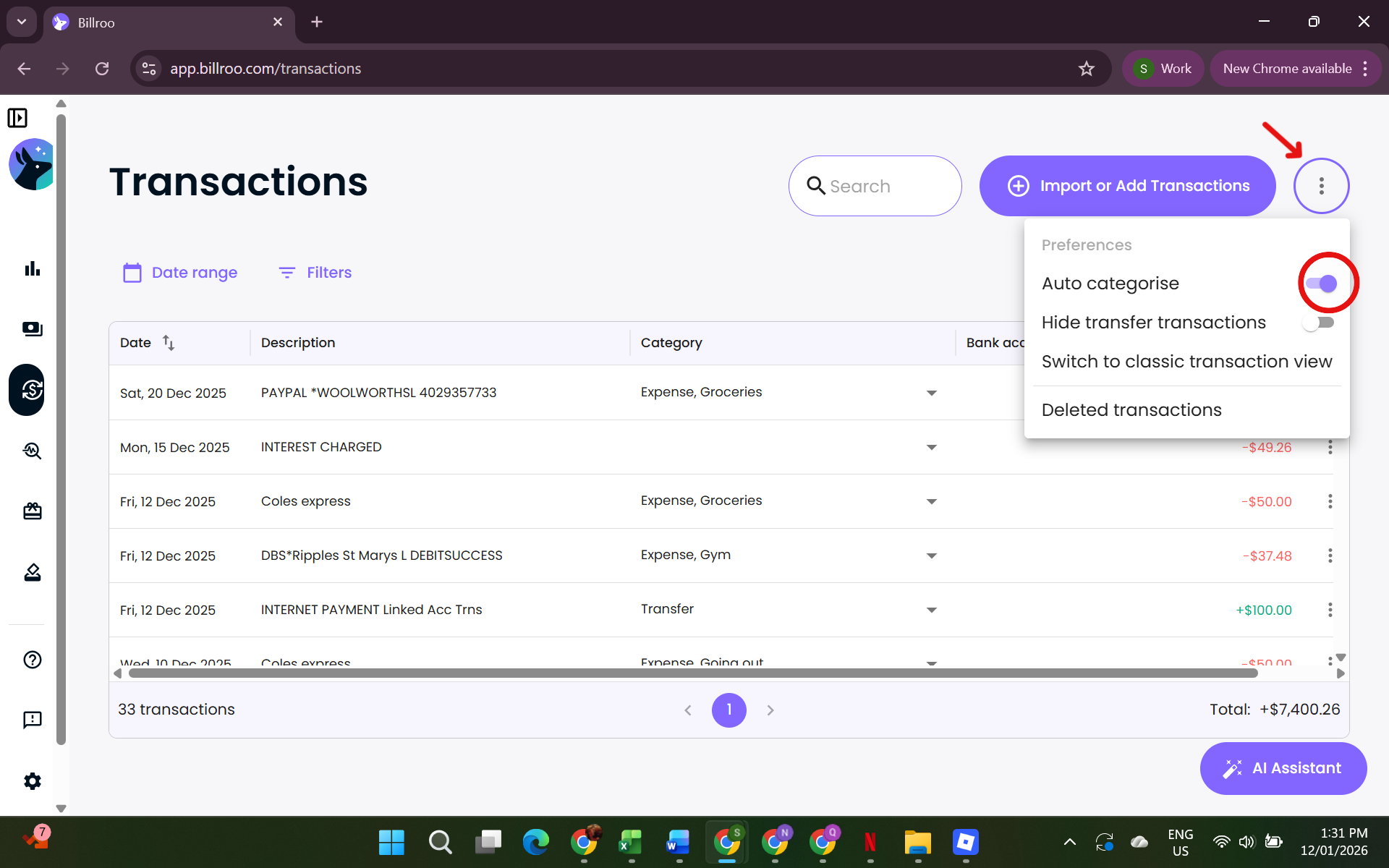
Click on the three dots (as indicated by the red arrow in the screenshot) to access additional options.
Check that the Auto categorize box is switched on (circled in red in the screenshot).
Once you activate this feature, it should also be enabled in the app, allowing for seamless transaction management across all platforms.
Need Further Assistance?
If you continue to experience issues with auto-categorization, feel free to reach out to our support team for further assistance. We're here to help you make the most of your Billroo experience!